- GlassFish Application Server: Introduction (WMT-SAS-1536)
- Designing Java Web Services (WJ-4112-EE5)
- Adding Quality of Service and .NET Interoperability to Web Services (WMT-SAS-1543)
- Creating Reliable and Secure Interoperable Web Services (WMT-SAS-2544)
- Creating Transactional Web Services (WMT-SAS-2545)
- Working With the Web Services Policy (WMT-SAS-2546)
Thursday, 29 January 2009
Free Java training courses

Thursday, 22 January 2009
DropDownList with OptGroup support
optgroup tag in their standard DropDownList asp control so it's not possible to group items on the list. Most of the workarounds found in Web suggest use of Control Adapter, like this one. However, there are couple things I don't like in this solution:
- Doesn't work correctly when DataSource, AutoPostBack or OnSelectedIndexChanged attributes are set
- Overrides regular regular behaviour & rendering of DropDownList items
- Works for all DropDownList controls on the page (cannot be switched off for some lists)
System.Web.UI.WebControls.ListControl. When overriding it is very useful to base on original implementation so the default behaviour is preserved. To get the original RenderContents method's code you can use .NET Reflector:
So, your custom list control needs to look as follows:
namespace MyNamespaceOnce you create your custom DropDownList you can use it on a page just like any other control. You only need to register it explicitly using following directive:
{
public class MyList : System.Web.UI.WebControls.DropDownList
{
protected override void RenderContents(
System.Web.UI.HtmlTextWriter writer)
{
// Custom implementation goes here
}
}
}
<%@ Register assembly="MyAssembly"
             namespace="MyNamespace"
             tagprefix="ma" %>
...
<ma:MyList ... />
Advantages of this appraoch:
- Original behaviour is preserved.
- You can use custom control only if you need grouping without affecting the rest of drop-downs on page
- You can implement several custom drop downs with different customizations
- Should work with AutoPostBack & OnSelectedIndexChanged
Saturday, 17 January 2009
Width of FileUpload control in Firefox
width attribute does the job (as expected). However, for some strange reasons it is completely ignored by FF.Solution:
To change the width of FileUpload control in FF you have to use
size attribute instead. Example:<asp:FileUpload ... size="50" />The units used by
size attribute are characters. Remember to use both size (for FF) and width (for all other browsers) to make the change visible for all users. Sometimes it may be tricky to make this field have the same width on all browsers. I'm not sure why Mozilla did it this way but I don't like it at all. Any Ideas?
I found solution here.
Tuesday, 30 December 2008
JS error "Sys is not defined" caused by HttpModule
I have an ASP.NET application that makes use of Ajax Control Toolkit. Everything was working fine until I decided to implement authentication on application level using HttpModules. It's basically about authenticating each request to your application with one piece of code - before each request is processed the code defined in appropriate HttpModule is executed. You can read more on that here or here.
After I've configured my application to use the custom authentication HttpModule all controls from Ajax Control Toolkit (ACT) stopped working. Instead, I was getting JavaScript error "Sys is not defined". The cause of that was the authentication module, which was checking URL parameters to grant access to requested resources.
I've discovered that ACT was dynamically loading additional .resx files from the server. The dynamic requests (sort of Ajax calls) didn't contain appropriate parameters so they were rejected.
Solution:
I've added additional if clause to my authentication code that was allowing all requests to .axd files to pass, regardless parameters. I could do that since none of the files created by me was in that format and I didn't have to care about authentication when such files are requested. Of course, I'm open for suggestions how to resolve this in cleaner way.
Friday, 5 December 2008
How to get assembly file from GAC?
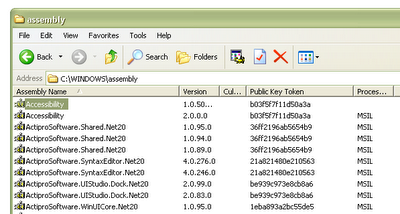 However, this view will only allow you to see the current GAC content and add/update libraries. This has some limitations e.g.:
- It won't let you get the actual library file. Sometimes you may need to do that e.g. to backup file from GAC before you replace it.
- You can't add files of different types e.g. PDB files. This could be useful if you'd like to see the line numbers in stack trace.
- ...
C:\windows\assembly\GAC_MSIL\Namespace.Project\
   <assembly_version_number>__<assembly_public_token_key>\Namespace.Project.dll
Example
We're looking for library with name = Kainos.Framework.Web, version = 1.0.0.0 and PublicTokenKey = 1111aaaa1111aaaa. You can find it at:
C:\windows\assembly\GAC_MSIL\Kainos.Framework.Core\Once you access the folder you can copy the assembly files, add pdb files, etc.
1.0.0.0__1111aaaa1111aaaa\Kainos.Framework.Core.dll
Thursday, 20 November 2008
IIS Error: "Unexpected Error 0x8ffe2740 Occurred"
"Unexpected Error 0x8ffe2740 Occurred"
Solution:
This happens because some required ports are not available. The most common application using required ports is Skype. You can conigure Skype to not use these ports:
- Open Skype
- Choose Tools > Options > Advanced > Connections
- Uncheck Use Port 80 and 443 as alternatives for incoming connections.
- Restart Skype
- Start IIS
Saturday, 1 November 2008
Error while exporting pages from SharePoint using SP Designer
"This page cannot be edited in Sharepoint Designer. You can edit the content in the browser, or edit the corresponding page layout in Sharepoint designer."

Solution:
- Open you Site Structure in SharePoint Designer
- Right click on your page and select “Detach from page layout”
- This will check the file out and right click again and select open > open with notepad
- This will display the content you need to export. You can save it to chosen location
Subscribe to:
Posts (Atom)
