Tuesday, 28 July 2009

ASP.NET: How to trigger the client-side validation manually

By default the client-side validation is triggered when submitting forms using buttons. However, sometimes you may want to trigger client-side validation on your ASP page manually from custom Javascript. You can achieve that by calling Javascript validation functions provided by the ASP.Net framework directly from your custom code.

The following page source example displays a TextBox and its validation controls (RequiredFieldValidator & ValidationSummary). The validation controls have the same ValidationGroup defined, which allows us to validate different page elements independently. The page displays also a DIV element that will cause the Validation action when clicked:
<!-- Validation Summary -->
<asp:ValidationSummary ID="ValidationSummary1" runat="server"
HeaderText="Validation errors:" ValidationGroup="Group1"/>

<!-- TextBox and its validator -->
Name: <asp:TextBox ID="TextBox1" runat="server" />
<asp:RequiredFieldValidator ID="RequiredFieldValidator1" runat="server"
ErrorMessage="Name is required" Text="*"
ControlToValidate="TextBox1" ValidationGroup="Group1"> />

<!-- Div that causes client-side validation when clicked -->
<div onclick="Validate();" >Validate Form</div>

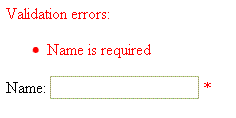
The code above should should produce smth like that when validation is triggered:

Validation form
Now let's take a look at the custom JS code that triggers the validation. There are couple ways to do that:
  • Easy way - works for all validators from the same ValidationGroup:
    function Validate()
    {
    // If no group name provided the whole page gets validated
    Page_ClientValidate('Group1');
    }
  • If you want to validate only specific validators:
    function Validate()
    {
    // Get the specific validator element
    var validator = document.getElementById('RequiredFieldValidator1');

    // Validate chosen validator
    ValidatorValidate(validator);

    // Update validation summary for chosen validation group
    ValidatorUpdateIsValid();
    ValidationSummaryOnSubmit(validationGroup);
    }

Useful links:

Friday, 3 July 2009

C# - Array to Dictionary

Recently I needed to convert an Array of DictionaryEntry<object,object> items into a Dictionary<string,string> object. Here is simple code using LINQ and ToDictionary method for doing that with 1 command:
DictionaryEntry<object,object>[] props = GetSomeProperties();
Dictionary<string,string> dict =
props.ToDictionary(de => (de.Key != null) ? de.Key.ToString() :
string.Empty);
de => (de.Value != null) ? de.Value.ToString() :
string.Empty);

Isn't that simple? :)

Friday, 26 June 2009

Windows could not start the IIS Admin Service on Local Computer

Sometime when starting IIS I'm getting the following error:

Windows could not start the IIS Admin Service on Local Computer. For more information, review the System Event Log. If this is a non-Microsoft service, contact the service vendor, and refer to service-specific error code -2147417831.

Event log is not much help:

The IIS Admin Service service terminated with service-specific error 2147549465 (0x80010119).

Solution:
Kill the inetinfo.exe process and start IIS again - that's it :)

Thursday, 18 June 2009

Handling exceptions from multiple UpdatePanels

In one of my previous posts I've already mentioned how to handle exceptions that occur within UpdatePanel on client side (see post). However, this did not cover server side error handling nor multiple UpdatePanels on one page.

Sometimes you may want to have on your ASP page multiple update panels or a large one containing multiple controls. The problem is that when an error occurs on update action you may find hard to localize the actual control that generated the error causing event. This may be required in some situations e.g. to display error message next to the control responsible for the exception.

Let's take a look at some code. Here is a sample ASP page with a ScriptManager and 2 UpdatePanels. Each of the panels contains a button and a label for displaying errors:
<asp:ScriptManager ID="ScriptManager1" runat="server" 
onasyncpostbackerror="ScriptManager1_AsyncPostBackError">
</asp:ScriptManager>

<!-- First Update Panel -->
<asp:UpdatePanel ID="UpdatePanel1" runat="server">
<ContentTemplate>
<asp:Button ID="B1" runat="server" Text="B1" onclick="B1_Click" />
<asp:Label ID="Label1" runat="server"></asp:Label>
</ContentTemplate>
</asp:UpdatePanel>

<!-- Second Update Panel -->
<asp:UpdatePanel ID="UpdatePanel2" runat="server">
<ContentTemplate>
<asp:Button ID="B2" runat="server" Text="B2" onclick="B2_Click" />
<asp:Label ID="Label2" runat="server"></asp:Label>
</ContentTemplate>
</asp:UpdatePanel>
As you can see the ScriptManager has an error handler defined (line 2) and both buttons have click handlers assigned. The error labels are empty on entry.
Here is Code Behind for that page:
  protected void B1_Click(object sender, EventArgs e)
{
throw new Exception("Exception from Button1");
}

protected void B2_Click(object sender, EventArgs e)
{
throw new Exception("Exception from Button2");
}

protected void ScriptManager1_AsyncPostBackError(
object sender, AsyncPostBackErrorEventArgs e)
{
// Do smth with the error e.g log it
}
Clicking on any of the buttons will cause an Exception. The exception message varies for each button. In my example the error handler for script manager does nothing but you can do whatever you need with the caught error e.g. log it.

Now, let's handle the error on client side. The following code will register client side error handler, which will display a message from the thrown exception next to appropriate button:
// Register EndRequest handler for ScriptManager
Sys.WebForms.PageRequestManager.getInstance().
add_endRequest(EndRequestHandler);

function EndRequestHandler(sender, args)
{
// If there is an unhandled error
if (args.get_error() != undefined)
{
// Get id of the control that fired the error-causing action
var senderControlId = sender._postBackSettings.sourceElement.id;

// Get Label next to the source control
var errorLabel = document.getElementById(senderControlId).
nextSibling.nextSibling;

// Set error message in appropriate control.
// You may want to remove the user-unfriendly part of the
// message that was added by Script Manager
errorLabel.innerHTML =
args.get_error().message.replace
('Sys.WebForms.PageRequestManagerServerErrorException: ', '');

// Mark the error as handled
args.set_errorHandled(true);
}
}

That's it. To make it work just place the JS code on your ASP page.

Thursday, 11 June 2009

Centering Adsense Ads on blogger pages

Recently I decided to add Adsense ads on my blogger page to earn zillions of $$$$. Blogger dashboard offers easy to use Adsense integration (Monetize tab). It helps you to create Adsense account and automatically places the ads on your blog page. The problem is that it doesn't offer much control over the way the ads are displayed, soe you can't e.g. center your ad, align it in to the right etc. To achieve that you'll need to create the ad manually through the Adsense page (see Adsense help) and then paste the code into your blogger template:
  1. From blogger dashboard got to:  Layout > Edit Html

  2. Check the "Expand Widget Templates" checkbox to see the detailed view of your template

  3. Find the place in the template where you'd like to place the ad.

  4. Create a div element that would store your ad and style it as much as you want (center it, add padding, etc.)

  5. Paste the code generated by Adsense into the div

  6. Change the following characters in the generated Adsense code:

    • < change to &lt;

    • > change to &lt;

    • " change to &quot;

    so the code for your Ad looks somehow like this (changed lines: 1, 2, 3, 5 & 8):
    <script type='text/javascript'>&lt;!--
    google_ad_client = &quot;pub-5***************&quot;;
    google_ad_host = &quot;pub-1***************&quot;;
    /* name of your ad */
    google_ad_slot = &quot;7*********&quot;;
    google_ad_width = 160;
    google_ad_height = 600;
    //--&gt;
    </script>
    <script src='http://some_google_linkto_js_file'
    type='text/javascript'>
    </script>
    It is important that you do this, otherwise you'll get a JS error 'pub is undefined' (or something similar) on the page and the ad will not be displayed.
Solution and automatic converter found here.

Friday, 29 May 2009

JS: Display tooltip over page element

To display a tooltip over a page element:
  1. Create hidden tooltip element:
  2. Create JS scripts for showing/hiding tooltip:
    function show()
    {
    var tooltip = document.getElementById('tooltip');
    tooltip.style.top = event.clientY;
    tooltip.style.left = event.clientX + 10;
    tooltip.style.display = 'block';
    }

    function hide(){
    var tooltip = document.getElementById('tooltip');
    tooltip.style.display = 'none';
    }
  3. Set Javascript events for the chosen page element:

    Element content
Tested on IE7.

Monday, 4 May 2009

The communication object, System.ServiceModel.Channels.ServiceChannel, cannot be used for communication because it is in the Faulted state.

A piece of code that I've been working on lately started to throw exceptions when calling a web service using a generated client. The log file contained only the exception message:

"The communication object, System.ServiceModel.Channels.ServiceChannel, cannot be used for communication because it is in the Faulted state."

Most of the suggestions found in Web blamed the invalid code, giving examples similar to the following one:

using (MyWebServiceClient service = new MyWebServiceClient())
{
service.DoSomeOperation();
service.Close();
service.DoAnotherOperation();
}
Since I was sure this was not the case I had to discover the real exception reason by myself.

Solution:

The using statement in the form presented above will mask any errors coming from the web service client and throw the "faulted state" exception instead, which may be irrelevant to the actual problem. To find out the real issue you can examine the InnerException property of the exception thrown (e.g. by logging it or debugging your app).

Alternatively you can add an additional try/catch to ensure that the real exception is thrown by your application rather than the "faulted state" one:

try
{
MyWebServiceClient service = new MyWebServiceClient()
service.DoSomeOperation();
service.Close();
}
catch (CommunicationException e)
{
service.Abort();
}
catch (TimeoutException e)
{
service.Abort();
}
catch (Exception e)
{
service.Abort();
throw;
}

You can read more about the reason for the "faulted state" exception on MSDN page (Thanks to Carl for the link).