Tuesday, 29 June 2010

PowerShell in Windows 7

In my current project we are using PowerShell in our build & deployment scripts. It's a useful tool offering a greatly extended set of commands comparing to regular cmd. On Windows XP I needed to install this manually but in Windows 7 PowerShell comes with the system.

Recently I changed my machine and system (XP -> W7) and discovered that the scripts don't work anymore. The reason for that was the insufficient execution policy set in PowerShell by default. I changed it to the one previously used on my old machine and... no effect!

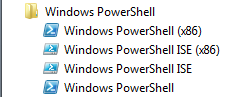
I started to think that the problem may not be caused by execution policy (although the error message was quite obvious) but then I found out there are actually 2 PowerShell versions installed: 64 a 32 bit. You can find them under "Windows PowerShell" folder in Accessories:

2 versions of PowerShell in Windows 7

Changing execution policy for both versions solved my problem.

Friday, 25 June 2010

Mysql foreign keys don't work

Recently I've been working on a small PHP+MySql project. I designed a database schema that contains multiple tables, some of them with FOREIGN KEY constraint defined. After my model was ready I exported it to SQL format and created the actual database from the script. I was very surprised discovering that the defined foreign keys constraints don't work i.e. I could add any data to the constrained columns regardless the content of referenced table.

Solution:
It came out that the problem was caused by the default ENGINE used by my MySql database i.e. MyISAM. Foreign key constraint is not implemented in its current version (read more here). To enable the FOREIGN KEY constraint I decided to use InnoDb ENGINE. I forced that by adding engine selection for each table:


CREATE TABLE IF NOT EXISTS `my_table` (
`id` INT NOT NULL ,
`other_table_id` INT NOT NULL ,
PRIMARY KEY (`id`) ,
FOREIGN KEY (`other_table_id` ) REFERENCES `other_table` (`id`)
) ENGINE = InnoDB;

Monday, 12 April 2010

Is tag a branch?

I've been working with version control software for couple years now. At the beginning it was CVS, now it's mainly SVN. I thought I had a good general understanding of such terms as branch, revision or tag.

Recently I was very surprised when I was asked to commit my changes into a TAG.
So I asked:
- You mean branch?
- No, Tag!
- ???

I always thought that a tag is just a 'marker' that marks a point in a branch and it doesn't branch the code. So what does committing to a tag actually mean? How to commit something to a tag without affecting the branch it was created for?

The answer for those questions can be found in TortoiseSVN documentation explaining what tags and branches actually are from technical perspective:

Tags are typically used to create a static snapshot of the project at a particular stage. As such they not normally used for development - that's what branches are for, which is the reason we recommended the /trunk /branches /tags repository structure in the first place. Working on a tag revision is not a good idea, but because your local files are not write protected there is nothing to stop you doing this by mistake. However, if you try to commit to a path in the repository which contains /tags/, TortoiseSVN will warn you.

Although Tortoise actually allows you to commit into a tag you should never do that! It actually branches the code and makes the code repository messy! After such operations there are actual branches under tags structure. I can't imagine what merging such branched tag with its original branch would actually mean?

But what if you need to add changes to the tagged release (a.g. patches)? Here is the proper way to solve such problem:

It may be that you need to make further changes to a release which you have already tagged. The correct way to handle this is to create a new branch from the tag first and commit the branch. Do your Changes on this branch and then create a new tag from this new branch, e.g. Version_1.0.1.

Now when I understand the problem better I'm just wondering why TortoiseSVN (other tools probably too) allows such operation (with warning). Are there any situations where it would be necessary?

Thursday, 1 April 2010

Line numbers in stack trace

When a .net application fails and an exception is thrown you may want to find the reason for such behavior. To identify the code that caused the exception you can examine the stack trace included in your exception. However, the stack trace may not contain line number, which makes the failing code harder to find, especially if you have a lot of code in single methods (not recommended).

Solution:
To ensure that line numbers are included in stack trace you need to deploy .pdb files together with your dll-s. Program database (pdb) files are created when you build your app in Debug mode. You need to copy them to the same directory where dll-s are placed.

Tip: GAC dll-s are stored under folder structure described here

Monday, 15 February 2010

Microsoft Second Shot returns

Those of you who are thinking about getting Microsoft certification may be interested in special offer called Second Shot. It allows you to take a free resit if you happen to fail the exam. Could it be any easier?

The offer is available from January 13, 2010 and it ends on June 30, 2010 so it may be an additional motivation for you.

More details here: http://www.prometric.com/microsoft/ss_mcp.htm

Tuesday, 12 January 2010

CSS trick for IE

I've just learned a very simple CSS trick that allows you assigning different attribute values if the page is rendered by IE. All you need to do is use '#' and '_' prefixes:

.myTestClass{
width: 5px; /* value used by all other browsers */
#width: 7px; /* value used by IE */
_width: 9px; /* value used by IE6 and older */
}


I don't think it's a part of the CSS official specification but it works ;)

Tuesday, 1 December 2009

Expression Web SuperPreview

Recently I've discovered a relatively new product from Microsoft for web development (Asp.Net or PHP) called Expression Web. The product itself looks more or less like Visual Studio with less options available ;)

The functionality that caught my eye was SuperPreview option. It allows developers to render the pages your working on using chosen browser engine within your development area. Available are all popular versions of IE and any other browser installed on your machine. It actually uses the real IE6 engine instead of any emulators. It also allows you to display the same page on multiple layers, each rendered using different engine. This allows you to find the differences much quicker.

You can read about this cool option in this article.

There is also a separate version of SuperPreview which doesn't require Expression Web but it only supports IE. You can download it from here. Here is how my blog looks like when IE6 & IE8 overlay:


PS. I just wish that SuperPreview functionality was available in VS2010. The Expression Web seems as a new product only from marketing perspective. Its designer/developer area offers exactly the same options as in VS (code/design/split views), except the SuperPreview of course. Since VS already supports ASP.NET development, it would be logical to simply add PHP support to it instead of releasing a new product. When I asked tech guys from Microsoft they couldn't really explain this, which I think proves they think the same :)