Monday, 9 June 2008

MonoRail & ActiveRecord localized validation messages

I'm currently developing .NET web application using MonoRail framework and ActiveRecord design pattern. One of the requirements for the project is easy localisation. In general it's pretty straightforward but I had some troubles figuring out how to localize the validation messages coming from ActiveRecord Business Objects.

Here's my solution for that:

  1. Create validation messages in resource file
    In your resource file (e.g Validation.resx) add entries for validation messages, e.g.
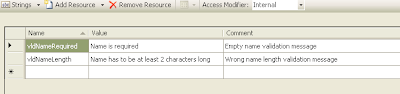
    Screen from VS 2008
    Of course, you'll need to define those entries in resource files for all languages your application should support (e.g. in Validation.de.resx for German, Validation.es.resx for Spanish, etc.).

  2. Add business objects validation attributes
    Let's use a sample business object representing User, which only includes name property. We have to add ActiveRecord attributes for validation e.g. ValidateNonEmpty and ValidateLength using appropriate parameters. These both attributes take the validation message as one of the arguments. Instead of giving here the actual message we can use its ID (name) from the resource file e.g. "vldNameRequired". Here is sample code of such Business Object:
    [ActiveRecord("User")]
    public class User : ActiveRecord
    {
    [Property(NotNull = true, Length = 50)]
    [ValidateNonEmpty("vldNameRequired")]
    [ValidateLength(1, 50, "vldNameLength")]
    public string Name { get; set; }
    }
    For more validation attributes please refer to ActiveRecord documentation.

  3. Catch validation errors
    Now, we have to enable validation for appropriate action. Let's say we want to validate data provided by the user while creating new account. For registering new user I've created the Register method together with appropriate data binds. Firstly we need to allow validation for that action (Validate = true).
    Catching validation errors is described in comments in code below:
    (...)
    using System.Resources;

    public class UserController : SmartDispatcherController
    {
    (...)
    public void Register([DataBind("User", Validate=true)]User user)
    {
    // Check whether the binded object is valid by calling the
    // HasValidationError inherited from SmartDispatcherController
    if (HasValidationError(user))
    {
    // If there are validation errors we can access the error
    // summary using GetErrorSummary method
    ErrorSummary summary = GetErrorSummary(user);

    // Now we have to populate Flash item with localized
    // validation messages by calling local private
    // method GetLocalizedMessages
    Flash["validationErrors"] = GetLocalizedMessages(summary);
    PropertyBag["user"] = user;
    }
    else
    {
    //If there are no errors save the new user and redirect
    //to other action
    User.Save(user);
    RedirectToAction('DoSomethingElse');
    }
    }

    /// <summary>
    /// Translates the message IDs to actual messages
    /// </summary>
    /// <param name="messageIDs">Message IDs to translate</param>
    /// <returns>Array of translated messages</returns>
    private string[] GetLocalizedMessages(string[] messageIDs)
    {
    string[] messages = new string[messageIDs.Length];
    for (int i=0;i<messageIDs.Length;i++)
    {
    // YourNamespace.Validation is the full name of your
    // resource file with validation messages
    messages[i] = YourNamespace.Validation.
    ResourceManager.GetString(messageIDs[i]);
    if (messages[i] == null)
    {
    // ERR_NO_RESOURCE is constant storing ID of default
    // error msg
    messages[i] = Validation.ResourceManager.
    GetString(ERR_NO_RESOURCE);
    }
    }
    return messages;
    }
    }
  4. Display localized validation messages
    Now you have to display validation error messages on the page. This is the sample code that displays all validation errors coming from ActiveRecord validation (I'm using NVelocity as my view engine):

    #if($validationErrors != null && $validationErrors.Length > 0)
    <ul class="validationErrors">
    #foreach($ve in $validationErrors)
    <li>$ve</li>
    #end
    </ul>
    #end
That's it. There are of course many possibilities for implementing that functionality. One of the enhancements could translate the ErrorSummary to the Dictionary<PropertyName, ValidationErrorMsg> so you can display error messages next to appropriate controls.

Wednesday, 7 May 2008

Generating C# Web Service Skeleton from wsdl

I need to create a C#.NET web service which adheres to a specific wsdl provided by a third party. Instead of browsing the wsdl content and creating the service manually I decided to look for a tool that provides a similar functionality to wsdl2java tool. What I found is wsdl.exe.

In order to generate a C# Interface for my web service I run this tool with options:
wsdl /language:CS /serverInterface wsdl_location
The command above generates the file "<wsdl _file_name>Interfaces.cs" in default location. Copy generated file to your web service project and create a new class implementing interface from generated file.

Example:
Let's assume we used the wsdl tool and have the generated interface for our service. The interface name is IMyServiceHttpBinding and contains the signatures of 2 methods: void foo(string text) and string goo(). Sample implementation may look as follows:

[WebService(Namespace = "http://somenamespace.com")]
public class MyService : IMyServiceHttpBinding
{
public void foo(string someText) {(...)}

public string goo() {(...)}
}

Enabling SSL in IIS 5

Currently I'm using Windows XP Pro and have IIS 5.1 installed. I tried to enable SSL for my IIS. Most of the instructions were quite complex, describing the manual generation and signing of certificates. However, I found much simpler solution which allows to enable SSL in few simple steps.

Basically, all you need to do is install IIS 6.0 Resource Kit and run the SelfSSL tool. That's it! The generated certificate is 'self-signed' so it may be suggested as untrusted by client's browser but it's completely enough for developers who need to test connections to their IIS using SSL.

I found this solution here.

Saturday, 26 May 2007

GRUB Error 17

Ever since I've added a new partition between my windows and linux partitions I get GRUB Error 17 after installing/updating some essential linux core elements. It is happening because GRUB config file gets overridden with a default one. I don't know how to solve this problem but I do know how to recover in an easy way. I've copied the /boot/grub/menu.lst file (grub configuration) to my home directory. Every time I get Error 17 after choosing Linux in my GRUB menu I:
  1. Reboot the system
  2. When GRUB menu appears I select linux option and press 'e' for editing
  3. I set correct parameters
  4. Press 'b' for booting
  5. When system loads I override /boot/grub/menu.lst with the stored one from my home folder
And that's it. I realize it is not a solution, but it works for me :)

Thursday, 24 May 2007

Master's Thesis presentation

Here is one of the presentations describing my current work. It is basically a simple digest of the theoretical part of my Master's Thesis. If you are interested in my other presentations you can take a look at my slideshare profile.


(Presentation may not be visible in some browsers under Linux)

Wednesday, 16 May 2007

100% CPU usage caused by atieventsd process

When I was checking yesterday the performance of my system I noticed that the system monitor shows permanent 100% CPU usage. It was quite weird because there where no other applications running. I clicked on the 'processes' tab and I found out that a process called 'atieventsd' was using all the possible CPU load. The process is related to ATI drivers. I searched through ubuntu fora I I found the solution for this problem in couple places (it seems that it affects many Ubuntu Dapper Drake users). For me worked this one

Wednesday, 2 May 2007

Javascript Timer object for active pages/tabs

Sometimes you want to fire an event on a webpage with a certain delay. There are couple ways to do that. Today I'm gonna present a JS Timer object, which waits a given amount of seconds after it's creation till it raises an alert. In addition out timer will work only when the page is active. If it looses a focus the timer stops. It resumes when it gains it back. Here is my code with some comments:
var TimerJob = Class.create();
TimerJob.prototype = {

/*PeriodicalExecuter*/ pe : null,

//numbers of seconds to wait
/*int*/ sec : 600,

//flag set after countdown finishes
/*bool*/ finished : false,

// Initializes the timer
initialize : function(){
this.pe = new PeriodicalExecuter(this.execute.bind(this),1);
window.onblur = this.abort.bindAsEventListener(this);
},

// Stops the timer countdown if page/tab looses focus
// Handles window.onblur event
abort : function(evt){
$('informer').innerHTML = "abort";
window.onblur = '';
window.onfocus = this.resume.bindAsEventListener(this);
this.pe.stop();
},

// Resumes the timer countdown when page/tab gains focus
// Handles window.onfocus event
resume : function(evt){
if(this.finished){
window.onfocus = '';
window.onblur = '';
}else{
this.pe = new PeriodicalExecuter(this.execute.bind(this),1);
window.onfocus = '';
window.onblur = this.abort.bindAsEventListener(this);
}

},

// Restarts the timer countdown
restart : function(){
this.pe.stop();
this.pe = new PeriodicalExecuter(this.execute.bind(this),1);
window.onblur = this.abort.bindAsEventListener(this);
},

// Action executed by timer each second
execute : function(_pe){

$('informer').innerHTML = this.sec;
this.sec--;
if(this.sec <= 0){
this.pe.stop();

alert("It is time!!!");

this.finished = true;
window.onblur = '';
window.onhelp = '';
}
},
}
The code above uses protoype.js library, which I already mentioned several times. Let me explain a little bit how it works. Initialize() method is a constructor, which starts the countdown. PeriodicalExecuter is an object from prototype.js library, which name explains everything :) Each second execute() method is invoked, which sets the number of seconds left in the page element identified by id 'informer'. Every time the page looses it focus (window.onblur) the abort() method is invoked which stops the countdown. When it gains focus back (window.focus) the resume() method is invoked. When the counter reaches 0 alert is raised and we don't care about focus or other stuff any more :)

Any questions?

PS. The code has been tested on Opera 9.2 and FF 1.5 (Ubuntu Dapper Drake)